New
Changelog
What every version brought, newest first. The app updates itself, so you always have the latest one.
Latest version: 2.8, released on 7 November 2026.
Latest
Version 2.8: It's called Creatyk now
Same app, new name: your tweaks, your history and your plan are all still here.
- A new logo: the C with its orbit.
- Downloads and the Community move to our own domain, creatyk.com.
- Defender and SmartScreen are changed in Windows Security: the card in Advanced → Security takes you straight there and warns you if no antivirus is protecting your PC in real time.
- Clean NVIDIA driver install: you enter Safe Mode yourself by following the card's steps; Creatyk no longer changes how Windows starts.
- Background updates no longer land in the middle of a game: they wait until you've finished playing and whatever you have running is done.
- Search (Ctrl+K) now also finds Fans, Processes, Backups and Resources.
- Safer updates and installs, with fewer reasons for your antivirus to get suspicious.
Version 2.7.1: Safer with Windows
A short release, on the same day as 2.7.
- Defender and SmartScreen are changed in Windows Security.
- The driver cleanup no longer restarts into Safe Mode on its own.
- Safer updates and installs.
Version 2.7: Discord, 40 new tweaks and a sharper look
Your tweaks and history are still here.
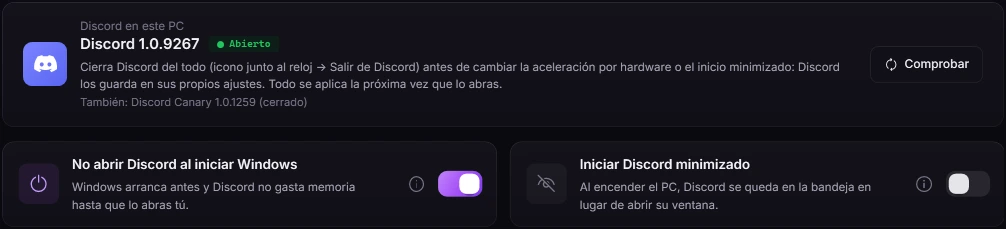
- A new logo: the C with its orbit, cleaner and sharp at any size.
- A Discord page in Tweaks: keep it from slowing down your games (hardware acceleration, priority, starting with Windows), plus a guide to what you change inside Discord.
- 40 new tweaks across every page of Tweaks.
- Everything sharper: menus, tooltips, program icons, big titles and the temperature chart.
- The NVIDIA / AMD tab only shows what applies to the graphics card you have.
Version 2.6: A new look: Nocturno
A new look, with everything closer at hand. Your tweaks and history are still here.

- The "Nocturno" look: almost black and cleaner, with any accent color you like (Appearance → Accent color).
- A menu in two parts, Overview and Tweaks, showing how many tweaks you have on in each page.
- Hardware, Tools and Customize gather their pages into one, with a bar along the top.
- Three plans: Spark (free), Nova and Quasar. If you already had a key, you're on Quasar: you get everything.
- Appearance with presets you make yourself, and a Community to share them.
- The Expedition, fans, graphics card (clean driver, NVIDIA settings, overclocking), network, mouse and more tools.
- Program logos in Install programs, and updates arrive by themselves even when the app sits next to the clock.
Includes 2.5.0, 2.5.1 and 2.5.2
Version 2.5: The biggest release yet
Your settings and history are still here.
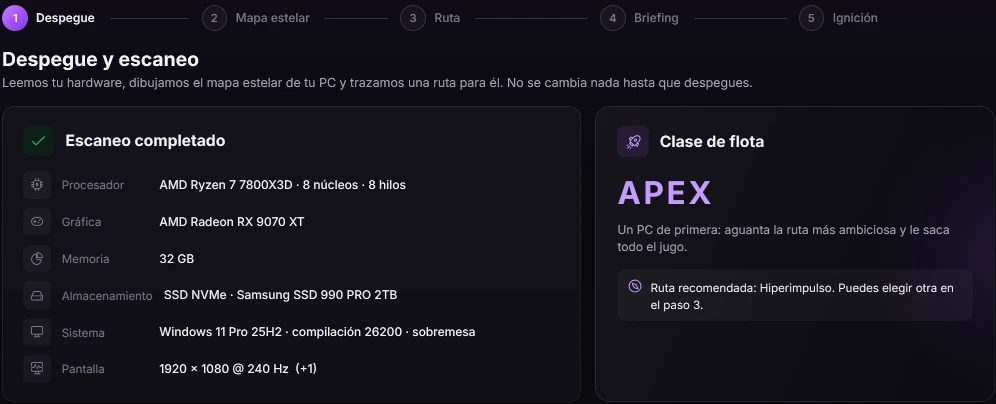
- Three plans: Spark (free), Nova and Quasar. If you already had a key, you're now on Quasar: you get everything.
- Appearance: new looks, presets you design yourself (colors, shape, font, effects and a background picture) and a Community to share them.
- Expedition: it scans your PC and charts a tweak route made for it, from Orbit to Singularity.
- Fans: fixed speed, temperature curves and presets, with a safety limit at 88 °C.
- Graphics card: automatic clean driver install with DDU, recommended NVIDIA settings and an overclocking assistant.
- Network and peripherals: bufferbloat test, 1:1 mouse check, polling rate test, open ports and a network scanner.
- Customize Windows, Processes and Resources: more tools in one place.
- A refreshed Home: temperature chart, ranks from Cadet to Admiral and recommendations for you.
Version 2.2: A new name and logo
It's the same app: your license, settings and history are all still here; only the name and the logo change.
- A gaming check on the home page: it tells you if your monitor runs below its top refresh rate, if Resizable BAR or XMP/EXPO are off, if your graphics driver is old and more, each with its fix.
- "Install programs" recognizes Chrome, Brave, Firefox, Discord and others even if you didn't install them with winget.
- Cleanup scans temporary files much faster.
- Game mode keeps Windows downloads paused for the whole game and, when freeing RAM, no longer touches audio, Discord, OBS or anticheat software.
- The app uses no CPU while minimized or in the tray, and no longer hangs at startup when the update server is slow.
- The installer speaks English, Spanish, French, German and Portuguese.
Version 2.1: Game mode and a free version
Two days after 2.0, and now on .NET 10.
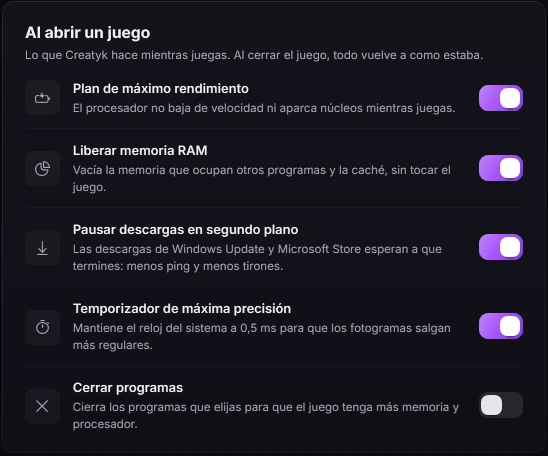
- Automatic game mode: when a game opens it puts your PC at full power, and when it closes it leaves everything as it was.
- A PC test, and the real FPS of your games.
- CPU and GPU temperatures.
- Install programs in one click.
- 2 new tweaks.
- A much lighter and faster app (.NET 10).
- A new free version: tools and basic tweaks without a license.
Version 2.0: A new tweak engine
The base for everything that came after: every change can be undone.
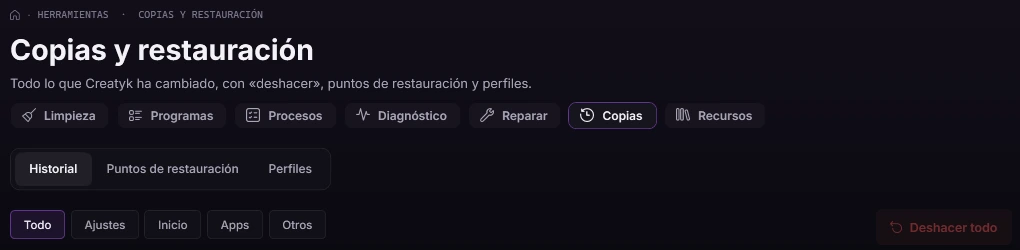
- Every tweak saves how things were before changing them, so you can undo them one by one or all at once.
- If a tweak fails halfway, it's rolled back entirely.
- A complete redesign of the app.
Always on the latest
Install it once and it keeps itself up to date, checking every version before using it. Never in the middle of a game.
For Windows 10 and 11 (64 bits). Free to start.