Plans and pricing

Creatyk Optimizer is free with Spark, forever. Nova and Quasar unlock the rest, monthly or lifetime.

Spark

To try the app and start feeling the difference.

Free

Forever, no key needed

Download Creatyk free
  • Orbit level: the safe tweaks you can already feel
  • Gaming check and the Orbit route of the Expedition
  • Cleanup, startup apps and the app installer
  • PC test, temperatures and bufferbloat test
Nova

Best value

Everything a gamer needs, at a price anyone can afford.

€1.99/month

or €14.99 lifetime

Buy Nova
  • Everything in Spark
  • Warp and Hyperdrive levels: 100+ tweaks
  • Automatic game mode and game profiles
  • Real FPS in your games, before and after

Quasar

Most complete

All of Creatyk, plus everything only Quasar has.

€3.99/month

or €29.99 lifetime

Buy Quasar
  • Everything in Nova
  • Exclusive: Singularity level, the most extreme tweaks
  • Exclusive: automatic clean graphics driver install (DDU)
  • Exclusive: GPU overclocking assistant
  • Spark is free forever and needs no key.
  • Undoing any change is always free.
  • If you buy and haven't activated the key yet, you have 14 days to withdraw.

Prices in euros. Your plan is activated with a key and tied to your PC. See everything each plan includes

Four levels, three plans

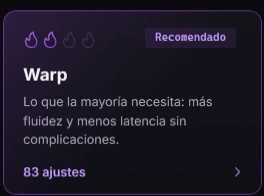
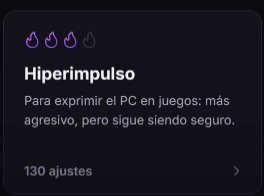
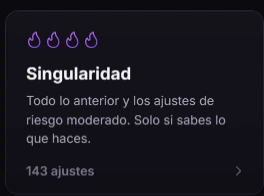
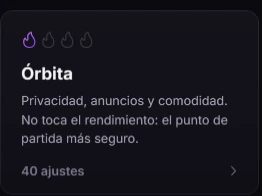
The one click optimization levels, as the app shows them. Orbit is free, Warp and Hyperdrive come with Nova, and Singularity is Quasar only.

  • The Orbit level card in Creatyk: one flame, privacy, ads and comfort (the app shown in Spanish).
    Spark
  • The Warp level card in Creatyk: two flames and the Recommended label (the app shown in Spanish).
    Nova
  • The Hyperdrive level card in Creatyk: three flames (the app shown in Spanish).
    Nova
  • The Singularity level card in Creatyk: four flames and the moderate risk tweaks (the app shown in Spanish).
    Quasar only

Everything each plan includes

Spark already has every tool. Nova adds what you feel most in games, and Quasar adds the exclusives.

Full comparison of the Spark, Nova and Quasar plans
FeatureSparkFreeNova€1.99/monthQuasar€3.99/month
Optimization
TweaksThe Orbit levelAll but SingularityAll 212
Optimize in one clickOrbitOrbit, Warp and HyperdriveAll four levels
ExpeditionOrbit routeRoutes up to HyperdriveSingularity too
Gaming checkIncludedIncludedIncluded
Remove preinstalled Windows appsNot includedIncludedIncluded
Games & performance
Automatic game modeNot includedIncludedIncluded
Game profilesNot includedIncludedIncluded
Real FPS in your gamesNot includedIncludedIncluded
PC test and temperaturesIncludedIncludedIncluded
Network & peripherals
Bufferbloat test, mouse test and open portsIncludedIncludedIncluded
Network optimization (Nagle, multimedia limit, DNS cache)Not includedIncludedIncluded
Port scanner for your local networkNot includedIncludedIncluded
Hardware
Driver: status, official links and clean install guideIncludedIncludedIncluded
17 recommended NVIDIA Control Panel settingsNot includedIncludedIncluded
Automatic clean driver install (DDU)Not includedNot includedIncluded
GPU power limit (overclocking assistant)Not includedNot includedIncluded
See fan speedsIncludedIncludedIncluded
Fan control: fixed, curves and presetsNot includedIncludedIncluded
Fan curves with the app closedNot includedNot includedIncluded
Tools
Cleanup, startup programs and the app installerIncludedIncludedIncluded
Repair Windows, diagnostics and resourcesIncludedIncludedIncluded
Processes: each program's memoryIncludedIncludedIncluded
Close programs from Processes and PortsNot includedIncludedIncluded
History and restore pointsIncludedIncludedIncluded
Export and import tweak profilesNot includedIncludedIncluded
Always
Appearance, presets and CommunityIncludedIncludedIncluded
Undo any changeIncludedIncludedIncluded
Automatic updatesIncludedIncludedIncluded

How the license works

Spark needs no key. Nova and Quasar are activated with one, on your PC.

  1. Buy Nova or Quasar in the store and you'll get a license key.
  2. In Creatyk, open Settings, go to License, paste the key and press "Activate".
  3. The app checks it online and ties it to this PC with an ID worked out on the PC itself. Your hardware details are never sent as they are.
  4. It's checked again every time you open the app. Without a connection, the app works as Spark until it's back.
One key, one PC
Each key works on the number of PCs it was issued for: one, unless your purchase says otherwise.
Monthly or lifetime
A monthly plan starts counting when you first activate the key; a lifetime plan never expires. The app reminds you in the last 5 days.
If your plan ends
The app keeps working as Spark. What you applied stays, and undoing it is still free.
If the server ever closed
We'd give 60 days' notice and publish a final version that doesn't need it, so no lifetime plan is ever lost.

Summarized from the license agreement the installer shows.

Questions about plans

Another question? Write to us at soporte@creatyk.com.

See every feature

Is Spark free forever?

Yes. It needs no key and never expires, and it includes the Orbit level, the gaming check, every tool, Appearance and the Community.

What happens when my plan ends?

Creatyk keeps working as Spark. Whatever you applied stays as it is, and undoing it is still free.

How many PCs does my key work on?

On the number of PCs it was issued for, usually one. If you change parts or reinstall Windows and the app counts it as a new PC, write to us and we'll free up your key.

Can I get a refund?

While the key isn't activated, you have 14 days to withdraw and we give back everything you paid. An activated key isn't refunded. If you live in Brazil, you have 7 days even after activating it.

Do I need an internet connection?

To activate and check Nova and Quasar, yes. If there's no connection when the app opens, it works as Spark and tries again by itself; if the connection drops while the app is open, your plan stays active until you close it.

What does the app send when it activates?

The key, an ID for your PC worked out on the PC itself (the hardware details never leave as they are), the app version and the plan. Nothing else.

How do I pay?

In the store the buy buttons open. There you see the final price, the payment options and how long the plan lasts before you pay.

Start for free with Orbit

The Orbit level, the gaming check, every tool and the Community cost nothing. And everything can be undone.

For Windows 10 and 11 (64 bits). Free to start.