
Security & privacy

What the app does on your PC, what leaves it and how everything is undone. Summed up from the license agreement the installer asks you to accept.

No ads, no analytics

No crash reports either. Apart from what each feature you use needs, the app sends nothing.

Need help? Settings → "Support report" puts a .zip on your desktop, without your key or your hardware ID. It only leaves your PC if you send it to someone.

Stays on your PC

  • Your settingsWhat you choose in the app, your game profiles and your presets.
  • Your change historyWhat the app changed and how it was before, so it can be undone.
  • The logsWhat the app did and when, in case something goes wrong.
  • Your test resultsThe PC test, the FPS of your games and the latency tests.

What leaves your PC, and when

Only what the feature you're using needs, and only to whoever makes it work. This is everything that travels, moment by moment.

  1. When you open the app

    It sends the app version, to look for updates, and asks for the current prices. On Spark, if you don't use the Community or anything that downloads, that's all that leaves your PC.

    Your PC

    download.creatyk.comDownloads server

    Sent

    • The app version
    • A price check

    Not sent

    • Your settings
    • Your history
  2. When you activate Nova or Quasar

    When you enter your key, every time the app starts and every few minutes while it stays open, it checks that your plan is active. Your PC's ID is a SHA256 hash made on your PC: the serial numbers it comes from are never sent.

    Your PC

    License serverCreatyk, on Cloudflare

    Sent

    • Your key
    • Your PC's ID (a hash)
    • The app version
    • Your plan

    Not sent

    • Your PC's serial numbers
  3. When you use the Community

    There are no accounts: it knows you by a code for your PC, a salted hash. When you publish, like, use or report a preset, it briefly keeps a hash of your IP to stop abuse. Whatever you publish is checked by a person before anyone sees it.

    Your PC

    community.creatyk.comCommunity server

    Sent

    • A code for your PC
    • What you browse, publish, like, use or report

    Not sent

    • Your license key
  4. If you link your Discord

    It's optional, and only on paid plans. Our server gets your ID, display name and avatar from Discord, shows them in the app and messages you on Discord if anything changes with your license. Unlink it in Settings whenever you like.

    Discord

    License serverGets the data from Discord

    Sent

    • Your Discord ID
    • Your display name
    • Your avatar
  5. When a feature downloads something

    Your graphics driver comes from NVIDIA; .NET, winget and the Microsoft Store from Microsoft; PresentMon, PawnIO, NVIDIA Profile Inspector and an unzipping tool from GitHub; DDU from Wagnardsoft. The bufferbloat test uses Cloudflare, and the latency tests Amazon Web Services and public DNS servers. Each of them sees your IP and handles it under its own policies.

    Your PC

    NVIDIA, Microsoft, GitHub…Straight to whoever provides it

    Sent

    • Your IP address
    • Your graphics card and Windows version, to NVIDIA, to find the driver
  6. When you ask for help

    The "Support report" gathers your settings, the logs and a summary of your PC (Windows, processor, graphics card, memory, motherboard and BIOS, disks, monitors and antivirus) in a .zip on your desktop. You decide whether to send it.

    Your PC

    Your desktopStays put unless you send it

    Sent

    • Nothing, until you send it

    Not sent

    • Your key
    • Your PC's ID

Your PC

download.creatyk.comDownloads server

Sent

  • The app version
  • A price check

Not sent

  • Your settings
  • Your history

Your PC

License serverCreatyk, on Cloudflare

Sent

  • Your key
  • Your PC's ID (a hash)
  • The app version
  • Your plan

Not sent

  • Your PC's serial numbers

Your PC

community.creatyk.comCommunity server

Sent

  • A code for your PC
  • What you browse, publish, like, use or report

Not sent

  • Your license key

Discord

License serverGets the data from Discord

Sent

  • Your Discord ID
  • Your display name
  • Your avatar

Your PC

NVIDIA, Microsoft, GitHub…Straight to whoever provides it

Sent

  • Your IP address
  • Your graphics card and Windows version, to NVIDIA, to find the driver

Your PC

Your desktopStays put unless you send it

Sent

  • Nothing, until you send it

Not sent

  • Your key
  • Your PC's ID

Everything can be undone

Nothing changes until you apply it. Before that, the app creates a Windows restore point and saves how each thing was, so it can put it back exactly.

  • Opening a page only reads your system. Changes happen when you click "Apply" or turn on a feature that changes things, such as game mode.
  • Before applying, it creates a Windows restore point. It's on by default, and if System Protection is off, the app offers to turn it on.
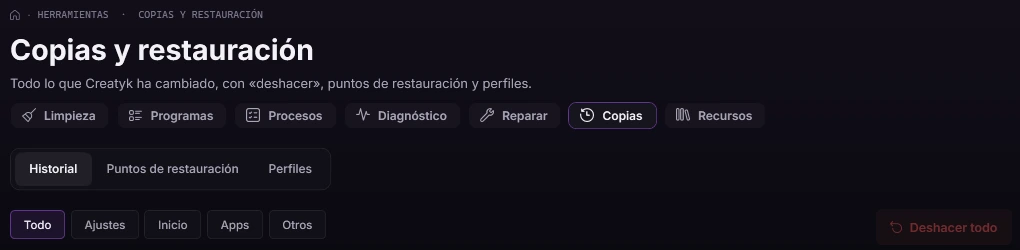
  • Undo each change, or all of them at once, in Tools → Backups. Undoing is free on every plan.
  • If a change fails halfway, it's rolled back entirely.
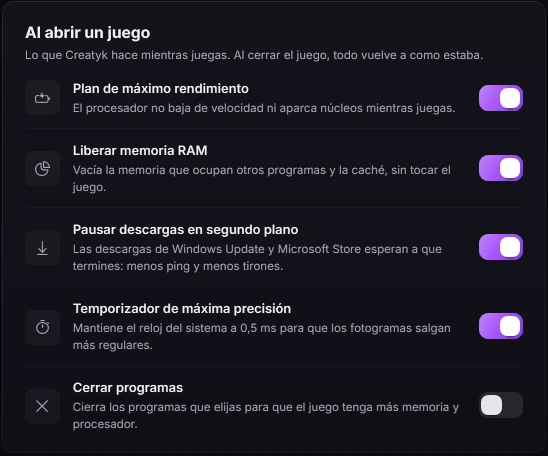
  • Game mode puts everything back when the game closes, or on the next start if the app or the PC crashed.
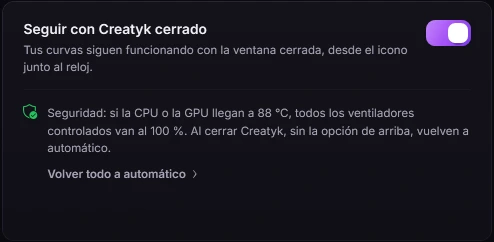
  • Fans go back to the BIOS when the app closes, and run at 100% if the CPU or GPU reaches 88 °C.
Backups and restore in Tools: the History, Restore points and Profiles tabs, filters by kind of change and the "Undo all" button (the app shown in Spanish).
The Restore points tab: Windows restore points take the whole system back from Windows recovery, with the "Open System Restore" and "Create point" buttons (the app shown in Spanish).
Game mode's "When a game opens" list, with the line "When the game closes, everything goes back to how it was": maximum performance plan, free up RAM, pause downloads, highest precision timer and close programs (the app shown in Spanish).
Game mode: when the game closes, everything goes back to how it was.
The "Keep going with Creatyk closed" card on the Fans page: if the CPU or GPU reaches 88 °C, every fan it controls runs at 100%; when Creatyk closes without that option, they go back to automatic (the app shown in Spanish).
Fans: at 88 °C they all run at 100%, and when the app closes they go back to automatic.

Why it asks for admin rights

Windows only lets a program with administrator rights change these things. Creatyk always opens that way, but it touches nothing until you choose what to change.

What it can change, depending on what you pick

  • Registry values
  • Services and scheduled tasks
  • How Windows starts: Safe Mode and BIOS/UEFI
  • Power plans
  • Network and DNS
  • Mouse and display
  • NVIDIA driver settings and the graphics card's power limit
  • Fan speeds
  • Programs that start with Windows
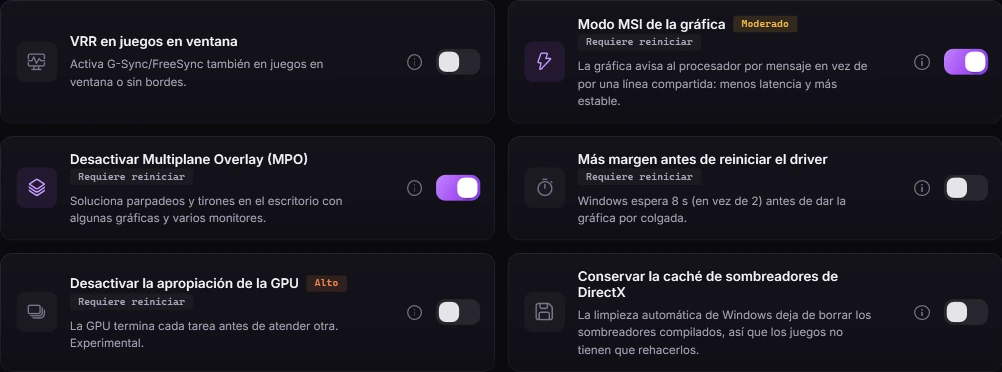
Six GPU and gaming tweaks in the app, each with its switch: "MSI mode for the graphics card" is tagged Moderate and "Disable GPU preemption" is tagged High; several say they need a restart (the app shown in Spanish).

Every tweak says what it risks

Its risk level and whether it needs a restart, in plain sight. And the ones that lower Windows security, like memory integrity or the Spectre and Meltdown mitigations, are marked.

Why SmartScreen warns you

Creatyk is new and isn't signed with a paid certificate, so Windows doesn't know it yet and shows a warning before opening it.

If Windows shows "Windows protected your PC", click "More info" → "Run anyway".

  • Only download it from creatyk.com.
  • The installer checks the app's SHA256 fingerprint before installing it, and Microsoft's signature on .NET.
  • Creatyk doesn't turn off Defender or SmartScreen by itself: those are changed in Windows Security, and the app takes you there.

Updates and your license

What happens after you install, in writing too.

Verified updates

When it opens, and about every 3 hours while it stays open, it looks for a new version and checks its SHA256 fingerprint before using it. When it's next to the clock, it updates at a quiet moment: never during a game, never while it's applying changes. Updates can't be turned off.

Your key stays on your PC

It's stored encrypted by Windows (DPAPI), and Settings → "Sign out" deletes it. If you swap parts or reinstall Windows, write to us and we'll free up your PCs. Revoking a key is always a person's decision, never an automatic one.

If we ever shut down

If we stop running the license server, we'll tell you in the app at least 60 days ahead and publish a final version whose paid features keep working without it. Lifetime plans are never lost.

Your data, your rights

You can ask us for a copy of the data tied to your key or your PC, have it corrected or deleted, or object to how we use it: write to soporte@creatyk.com. You can also complain to your country's data protection authority.

  • We only use this data to give you your license, updates and the Community, and to prevent abuse.
  • A license's data is kept while the license exists.
  • Our servers run on Cloudflare, and the app's releases are stored on GitHub.

The full terms are in the license agreement the installer shows you.

Write to support

Start for free with Orbit

The Orbit level, the gaming check, every tool and the Community cost nothing. And everything can be undone.

For Windows 10 and 11 (64 bits). Free to start.